Proxy Access Management
Configure the upstream proxy the managed browser routes traffic through.
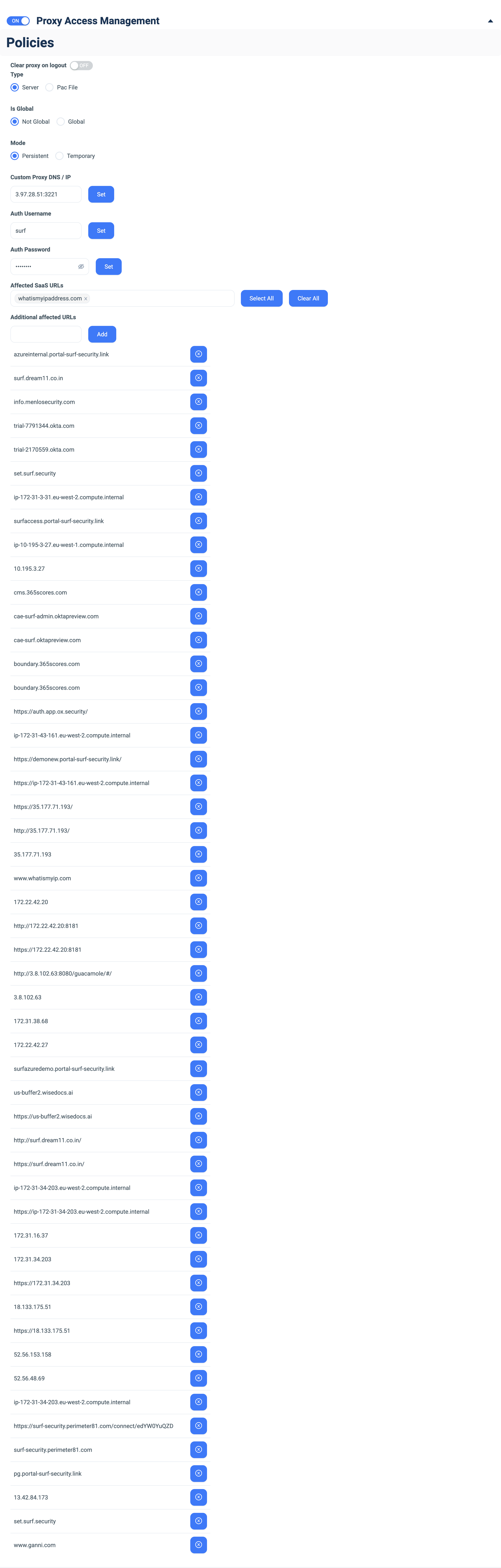
Configure the fields below, then changes apply to the selected group.How to set up:
- Toggle Proxy Access Management ON.
- Clear proxy on logout — ON to drop the proxy config when the user logs out.
- Type — Server (host/port) or Pac File.
- Is Global — Global (apply everywhere) or Not Global (this policy only).
- Mode — Persistent (standing) or Temporary (session-only).
- Custom Proxy DNS / IP — enter host:port (e.g. 3.97.28.51:3221) and click Set (or the PAC file URL when Type = Pac File).
- Auth Username / Auth Password — enter the proxy credentials and click Set.
- Affected SaaS URLs — pick the SaaS hosts the proxy applies to (use Select All / Clear All).
- Additional affected URLs — type a hostname and click Add.